
Eloquence Text To Speech1.3.3 - Google Play
You'll be able to see results in few seconds.
Publisher Description
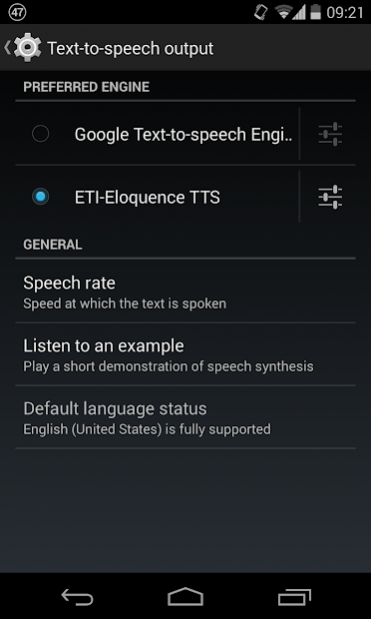
ETI-Eloquence Text To Speech (TTS) is an Android ported version of the popular Eloquence Text-To-Speech synthesizer.
ETI-Eloquence is a TTS engine that you can use in a wide range of applications such as:
- Screen readers and applications for blind people (like Talkback or Mobile Accessibility)
- GPS software
- E-book readers
- Translators
- And many more!
*** IMPORTANT NOTE ***
- Recent Google apps updates force using their own voices. GPS apps (maps) or the AI assistant, ignore text-to-speech settings, only allowing Google TTS. This decision from Google has been strongly discouraged by the Android community but as for now, we cannot ensure compatibility for this apps. As an alternative, you can use ETI-Eloquence on other GPS apps like "Navigator" or "Sygic", that are compatible with Google Speech APIs.
***************************
The main features of ETI-Eloquence TTS are:
- 10 languages included with a single purchase: US English, UK English, Spanish (Spain), Spanish (Mexico), German, Finnish (Finland), French (France), French (Canada), Italian and Portuguese (Brazil)
- Speed and pitch configuration
- User Dictionary: possibility to add, edit or remove words from a dictionary to customize the pronunciation
- Emoji support
Once the application is installed on your device, you can make ETI-Eloquence your default TTS engine by going to Settings > Language & input > Text-to-Speech output and checking "ETI-Eloquence TTS" as your default preferred engine.
All Android devices from 4.0 onwards are supported.
About Eloquence Text To Speech
The company that develops Eloquence Text To Speech is Code Factory. The latest version released by its developer is 1.3.3.
To install Eloquence Text To Speech on your Android device, just click the green Continue To App button above to start the installation process. The app is listed on our website since 2019-07-10 and was downloaded 0 times. We have already checked if the download link is safe, however for your own protection we recommend that you scan the downloaded app with your antivirus. Your antivirus may detect the Eloquence Text To Speech as malware as malware if the download link to es.codefactory.eloquencetts is broken.
How to install Eloquence Text To Speech on your Android device:
- Click on the Continue To App button on our website. This will redirect you to Google Play.
- Once the Eloquence Text To Speech is shown in the Google Play listing of your Android device, you can start its download and installation. Tap on the Install button located below the search bar and to the right of the app icon.
- A pop-up window with the permissions required by Eloquence Text To Speech will be shown. Click on Accept to continue the process.
- Eloquence Text To Speech will be downloaded onto your device, displaying a progress. Once the download completes, the installation will start and you'll get a notification after the installation is finished.
Program Details
System requirements
Download information
Pricing
Version History
version 1.3.3
posted on 2019-07-10
- Added emoji pending translations for all languages.
- Added support to new Unicode 12 emojis.
- Several fixes and improvements.
version 1.3.3
posted on 2019-07-10
- Added emoji pending translations for all languages.
- Added support to new Unicode 12 emojis.
- Several fixes and improvements.
version 1.2.6
posted on 2016-06-15
- Preliminary support for Android N.,- Preliminary support for Android TV.,- Added English support for Unicode 8.0 and 9.0 emojis.,- Fixed issue while reading long texts.
Disclaimer
Official Google Play Link
We do not host Eloquence Text To Speech on our servers. We did not scan it for viruses, adware, spyware or other type of malware. This app is hosted by Google and passed their terms and conditions to be listed there. We recommend caution when installing it.
The Google Play link for Eloquence Text To Speech is provided to you by apps112.com without any warranties, representations or guarantees of any kind, so access it at your own risk.
If you have questions regarding this particular app contact the publisher directly. For questions about the functionalities of apps112.com contact us.
